AI Support Insights Dashboard
Clean analytics UI for AI-powered customer service team performance
Prompt
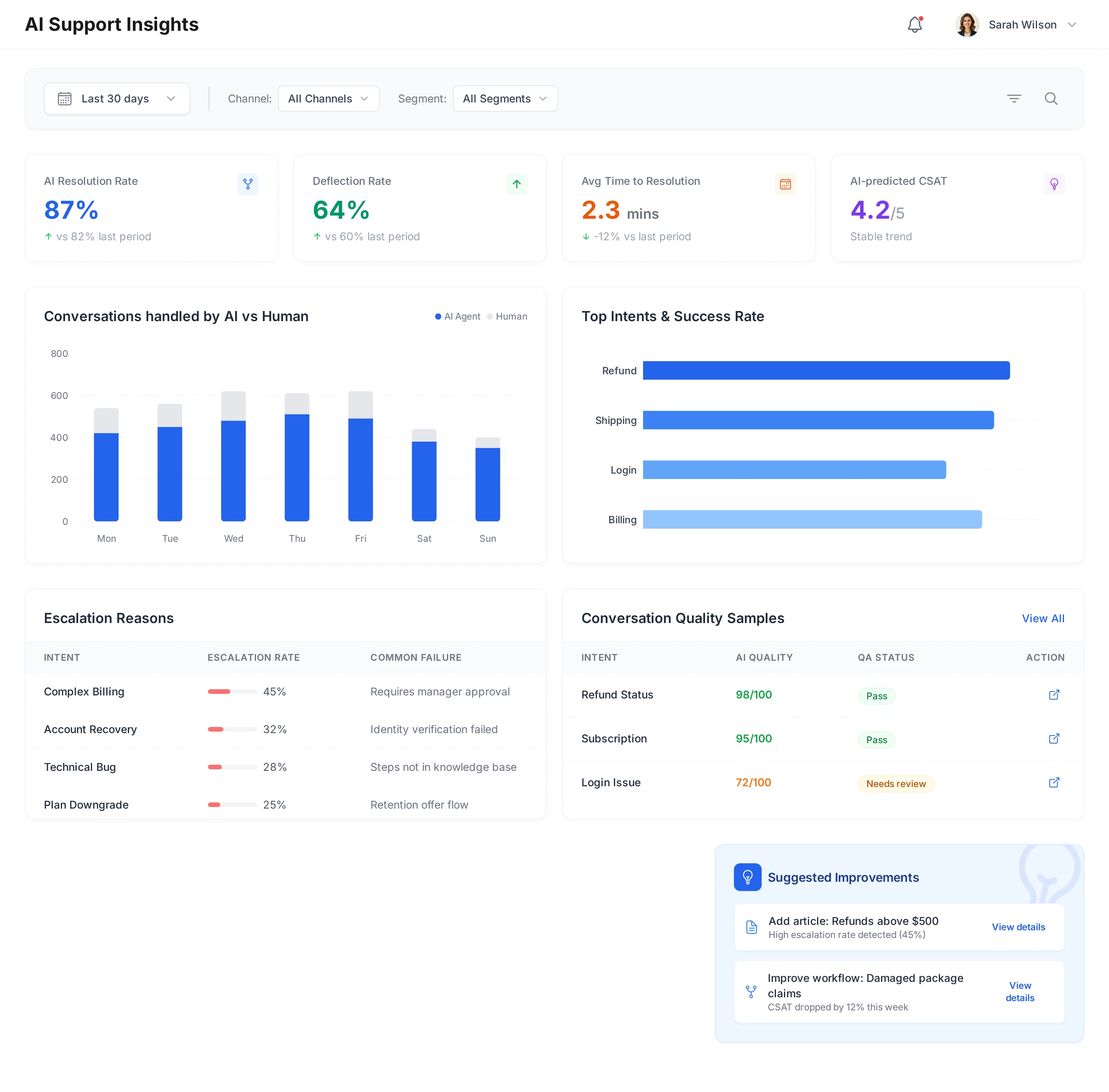
Design a desktop web app "AI Support Insights" dashboard for an AI-powered customer service team.
Viewport: 1440px width desktop.
Goal:
Give support leaders a clear view of how the AI Agent and human agents are performing, which topics are working well, and where to improve content or workflows.
Layout:
- Top filter bar:
- Date range picker
- Channel filter (Chat, Email, Phone, Messaging)
- Segment filter (Free, Pro, Enterprise)
- First row: KPI cards (4 cards)
- AI Resolution Rate
- Deflection Rate (tickets resolved by AI without human handoff)
- Avg. Time to Resolution
- AI-predicted CSAT
- Second row: Two main charts
- Left: "Conversations handled by AI vs Human"
- Stacked bar chart by day/week.
- Right: "Top Intents & Success Rate"
- Bar chart showing intents (Refund, Shipping, Login, Billing) with accuracy / resolution metrics.
- Third row: Quality & Escalation
- Left: "Escalation Reasons" list
- Table showing: Intent, Escalation rate, Common failure reason.
- Right: "Conversation Quality Samples"
- Table with sampled conversations:
- Intent
- AI Quality score (auto QA)
- Manual QA status (Pass / Needs review)
- Link/button "Open conversation"
Visual style:
- Clean analytics UI with a white background and subtle card shadows.
- Use a consistent color palette across charts (AI vs Human, Positive vs Negative).
- Typography: crisp, data-friendly sans-serif.
- Minimal decoration; focus is on clarity and interpretability.
Add:
- A small callout at the bottom right: "Suggested improvements", listing:
- "Add article: Refunds above $500"
- "Improve workflow: Damaged package claims"
- Each with a button "View details".
Tag
Artificial Intelligence
Productivity
Case Introduction
An AI Support Insights desktop dashboard web app for customer service teams. This case showcases a complete analytics experience with KPI cards, conversation charts, escalation analysis, and quality samples, all designed with clean white background, subtle card shadows, and data-friendly typography.
More Related Cases
Real-world designs created with Motiff AI across mobile and web platforms